




When I first started in digital marketing, I thought the only way to get traffic was to pay for it. I spent thousands on ads, watching my budget drain away the moment I stopped paying. Then, I discovered the power of organic search.
I want to share a quick story about a client of mine – let’s call him David. David runs a specialized e-commerce store selling ergonomic office furniture. For two years, he relied entirely on social media ads. His sales were decent enough, but his profit margins were razor-thin because his customer acquisition cost was so high.
The result? Six months later, David’s organic traffic went from 200 visitors a month to over 12,000. More importantly, his revenue tripled, and his profit margins soared because he wasn’t paying for those clicks. This isn’t magic; it is the result of applying solid SEO basics.
Understanding the basics of SEO for beginners goes beyond getting more eyeballs on your site; it is more about building trust with your target audience. Ranking #1 on Google is the ultimate form of digital social proof. It signals to users – and to potential partners – that you are the authority in your niche.
Furthermore, either as a business owner or a blogger looking to monetize, you need to know that the quality required for Google AdSense approval aligns perfectly with the quality needed to master SEO Basics for Beginners. You cannot have one without the other. AdSense requires unique, high-value content that provides a great user experience.
According to BrightEdge, 53% of all website traffic comes from organic search. This dwarfs social media and paid ads combined. This is why these SEO basics for beginners are a non-negotiable business skill in 2025.
What is SEO? Breaking Down The Basics of SEO for Beginners
At its core, SEO (Search Engine Optimization) is the process of improving your website to increase its visibility when people search for products or services related to your business in Google, Bing, and other search engines. But let’s strip away the jargon.
SEO is simply about understanding what your customers are looking for and ensuring your website provides the best possible answer.
The 3 Pillars: The Core of SEO Basics for Beginners
To truly grasp SEO basics for beginners, I break the discipline down into three core pillars. Think of these as the legs of a stool; if one is missing, the whole strategy falls over.
- Technical SEO: This is the foundation. It refers to the non-content elements of your website. Does your site load fast? Is it secure (HTTPS)? Is it mobile-friendly? Without this, your SEO basics will fail because Google won’t recommend a broken website.
- On-Page SEO: This is the content-focused pillar of SEO basics for beginners. It involves optimizing individual web pages to rank higher. This includes your headlines, the quality of your writing, your keywords, and your images. This is where you will likely spend 80% of your time.
- Off-Page SEO: This concerns your authority. It involves activities taken outside of your own website to impact your rankings within search engine results pages (SERPs). The biggest factor here is backlinks (links from other sites to yours), which act as votes of confidence.
The ultimate goal of these beginner SEO basics is simple: to provide the best answer to a user’s query. Google doesn’t just want to match keywords; it wants to solve problems.
How Search Engines Work: The ‘Doubts’ Behind SEO Basics for Beginners
To apply SEO basics for beginners effectively, you must understand the machine you are trying to impress. Search engines like Google have three primary functions: Crawling, Indexing, and Ranking.
Crawling & Indexing: How Google Finds Your Content
Imagine the internet is a library with billions of books, but no central filing system. Google is the librarian.
- Crawling: Google sends out teams of robots (known as crawlers or spiders) to find new and updated content. They “crawl” from link to link.
- Indexing: Once the crawler finds a page, it renders the content and stores it in a massive database called the Index.
This process is fundamental to SEO basics for beginners. If Google cannot crawl your site (perhaps because of a technical error blocking the bots), your page will never be indexed. If it’s not indexed, it’s invisible. It doesn’t matter how good your content is.
Tip: Google’s AdSense bots also need to crawl your site to review your content for policy compliance. A clean, crawlable site structure is a non-negotiable part of the SEO basics for beginners aiming for monetization.
Ranking & AI Overviews: How Google Uses Your SEO Basics
When a user performs a search, Google scours its index for the most relevant content and orders it by popularity and authority. This is Ranking.
This landscape is shifting with AI Overviews (part of the Search Generative Experience or SGE). Google now uses AI to generate a snapshot answer at the very top of the results.
To appear here, your SEO basics must evolve. You can no longer just write for robots. You must write for humans. Google’s algorithms prioritize E-E-A-T (Experience, Expertise, Authoritativeness, and Trustworthiness). They are looking for direct, concise answers backed by credible data. If you want to rank in the AI era, answering the user’s question immediately is vital.
Keyword Research: The #1 Most Important of the SEO Basics for Beginners
If you ask me what the single most critical step in SEO is, I will tell you it is keyword research. This is the compass of your strategy. Without it, you are just writing into the void.
Understanding Search Intent (The ‘Why’ Behind the Query)
Many guides on SEO basics for beginners skip this, but it is crucial. You must understand Search Intent. This is the reason a user types a query.
- Informational Intent: The user wants to learn. Example: “how to fix a leaking sink.”
- Transactional Intent: The user is ready to buy. Example: “buy 10mm wrench.”
If you try to sell a wrench on a page targeting “how to fix a sink,” you will fail. If you write a history of wrenches on a page targeting “buy wrench,” you will also fail. Matching intent is the most critical concept in SEO Basics for Beginners.
Finding Long-Tail Keywords: A Quick Win for SEO Beginners
When you are just starting with SEO basics, you cannot compete with giants like Amazon or Wikipedia for broad terms like “shoes” or “marketing.”
Instead, you must target Long-Tail Keywords. These are longer, more specific phrases. They have lower search volume, but much higher conversion rates and lower competition.
Case Study: The Niche Blogger
I worked with a travel blogger who wanted to rank for “Paris travel.” She was getting zero traffic because the competition was too high. We shifted her strategy to target specific long-tail keywords like “best vegan restaurants in Paris for families” and “Paris travel guide for solo female travelers.”
Within three months, she ranked #1 for five of these long-tail terms. Her traffic wasn’t in the millions, but it was highly targeted, and her affiliate revenue skyrocketed.
Here is a comparison to help you visualize why long-tail keywords are essential for SEO basics for beginners:
| Feature | Short-Tail Keywords (Head Terms) | Long-Tail Keywords |
| Example | “Shoes” | “Best running shoes for flat feet” |
| Search Volume | High | Low to Medium |
| Competition | Very High | Low |
| Conversion Rate | Low | High |
| Search Intent | Vague | Specific |
| Best For | Established Authority Sites | Beginners & Niche Sites |
Data Point: According to Ahrefs, 92% of all keywords get fewer than 10 monthly searches. This “golden middle” of specific, low-competition queries is where you will find your initial success.
On-Page SEO: Actionable SEO Basics for Beginners to Implement Today
Once you have your keywords, you need to place them strategically on your page. This is On-Page SEO.
Title Tags & Meta Descriptions: Your Digital Billboard
Your Title Tag is the blue link that shows up in Google search results. It is the single most impactful on-page factor. It must include your primary keyword and be enticing enough to click.
Your Meta Description is the short text below the title. While it doesn’t directly affect rankings, it hugely impacts your Click-Through Rate (CTR). Think of these as your ad copy.
Content Structure (H1, H2, H3s) for Readability
Structuring your content is one of the easiest SEO basics for beginners to master.
- H1: This is your main headline. There should only be one H1 per page, and it must contain your target keyword.
- H2: These are your main subheadings (like the ones in this article).
- H3: These break down H2s into smaller sections.
This structure helps Google bots understand the hierarchy of your information, but more importantly, it helps human readers skim your content. Large walls of text kill user engagement.
Internal Linking & Image Optimization: Easy SEO Basics
Internal Linking involves linking from one page on your site to another page on your site. This helps spread “link equity” (authority) and keeps users on your site longer – a positive ranking signal.
Image SEO is often overlooked. Google cannot “see” images; it reads them. You must use Alt Text to describe your images (e.g., “chart showing SEO traffic growth”). Furthermore, compress your images using formats like WebP. Large image files slow down your site, which hurts your rankings.
AdSense Requirement Note: For AdSense approval, “Content depth” is vital. Thin content (300-500 word posts) is the #1 reason for rejection. I always recommend aiming for at least 1,500 words of original, high-value content per post to satisfy these basics for beginners.
Technical SEO: The ‘Under-the-Hood’ SEO Basics for Beginners
You don’t need to be a coder to handle the basics of SEO for beginners, but you do need to ensure your engine is running smoothly.
Mobile-First Indexing: Why Your Mobile Site is #1
Google practices Mobile-First Indexing. This means Google looks at the mobile version of your website to decide where to rank you. If your desktop site is beautiful but your mobile site is broken, you will not rank. Period. Ensuring your site is responsive is a non-negotiable concept in SEO Basics for Beginners.
Core Web Vitals & Page Speed: The Need for Speed
User experience is a ranking factor. Google uses a set of metrics called Core Web Vitals to measure speed, responsiveness, and visual stability.
Statistic: Google data shows that the probability of a user “bouncing” (leaving immediately) increases 32% as page load time goes from 1 second to 3 seconds.
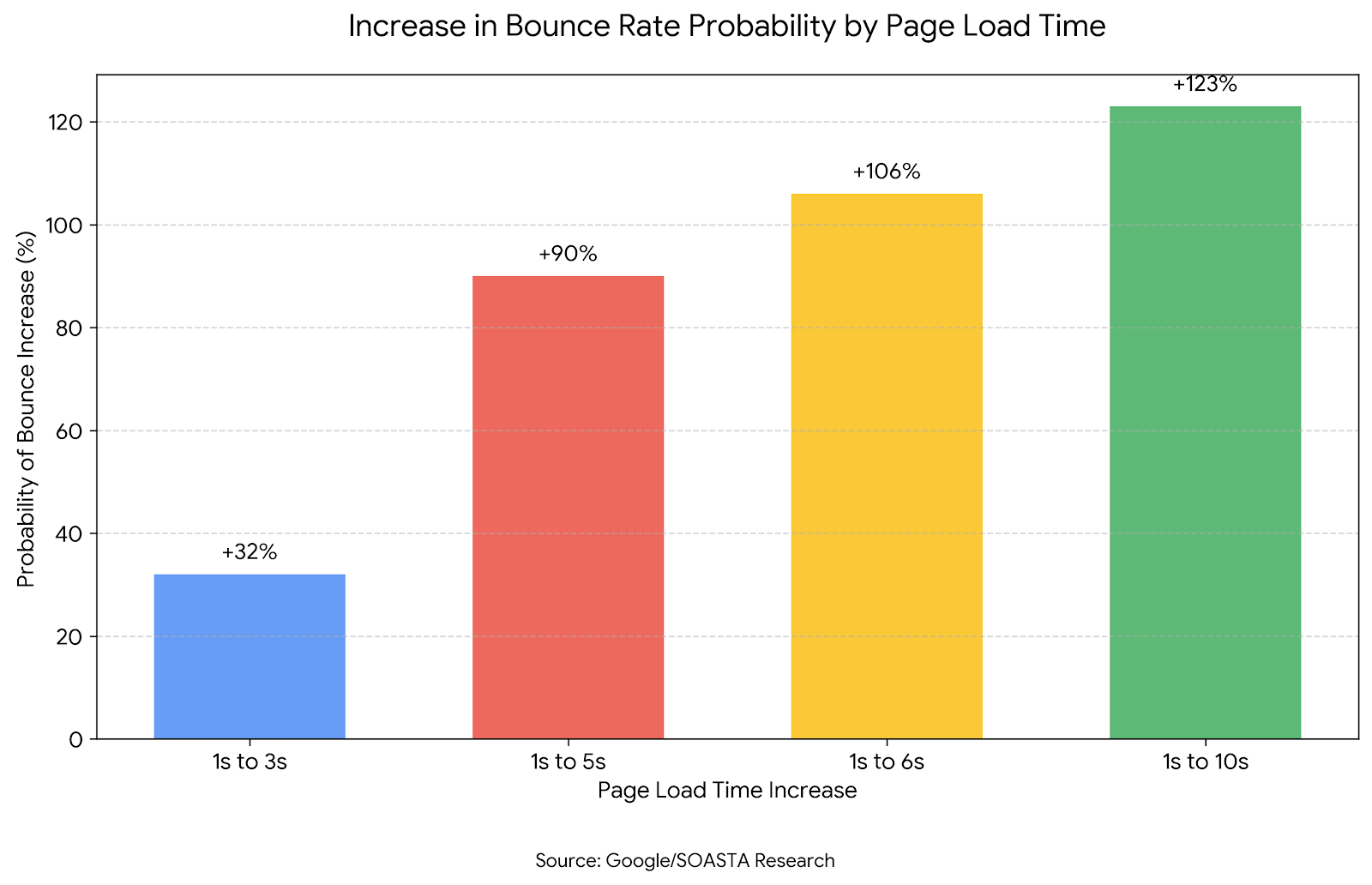
To handle this SEO basic, use Google PageSpeed Insights. It is a free tool that tells you exactly what is slowing your site down. Usually, it is uncompressed images or bad hosting.
Finally, make sure you submit your XML Sitemap to Google Search Console. This is essentially a map of your website that you hand to the Google librarian to ensure they can find every page.
Off-Page SEO: Beyond the Basics of SEO for Beginners
Off-page SEO is often the hardest part of SEO basics for beginners because you have less control over it. It is primarily about building Backlinks.
What are Backlinks? (Quality vs. Quantity)
A backlink is created when one website links to another. Google views this as a vote of confidence. However, not all votes are equal.
One link from a high-authority site like Forbes, a university (.edu), or a major industry publication is worth more than 1,000 links from low-quality directories.
Case Study: The Local Service Business
I helped a local roofing company that was struggling to rank in their city. We didn’t buy links (which is against Google’s policies). Instead, we created a high-quality infographic about “Winterizing Your Roof in Chicago” and shared it with local news stations and home improvement blogs.
Three local news sites picked it up and linked back to us as the source. Within two months, the roofer moved from page 3 to position #1 for “roof repair Chicago.” This demonstrates that quality content earns quality links.
Understanding E-E-A-T: The Trust Factor
Google uses a concept called E-E-A-T (Experience, Expertise, Authoritativeness, Trustworthiness) to evaluate content.
- Experience: Have you actually used the product or service?
- Expertise: Do you have the necessary knowledge?
- Authoritativeness: Are you known in your industry?
- Trustworthiness: Is your site secure and accurate?
This is the specific metric Google quality raters use. It validates all your other SEO basics and is critical for AdSense approval.
How to Track Your SEO Success
You cannot improve what you do not measure. To ensure your implementation of SEO basics for beginners is working, you need two free tools.
- Google Search Console (GSC): This is the health monitor for your website. It shows you which queries you are ranking for, how many clicks you are getting, and alerts you to any technical errors.
- Google Analytics 4 (GA4): This tracks user behavior. It tells you who is visiting your site, how long they stay, and if they are converting (buying or signing up).
The key metric to watch is Organic Traffic Growth over time. If this line is trending up, your SEO basics are paying off.
Conclusion
We have covered a lot of ground. From Technical SEO to On-Page content and Off-Page authority, you now possess the complete toolkit of SEO Basics for Beginners.
Remember, SEO is a marathon, not a sprint. It requires patience. You likely won’t see major results in week one. But if you remain consistent – publishing high-quality content and optimizing your site – the results will compound.
Your Next Step: I want you to pick just one page on your website today. Use this guide to audit it. Check the title tag, optimize the headers, and ensure it answers the user’s intent.
Frequently Asked Questions About SEO Basics for Beginners
How long does it take for SEO basics to work?
While some SEO basics for beginners (like fixing a broken title tag) can show results in days, significant organic traffic growth typically takes 3 to 6 months. It takes time for Google to trust your new content.
Can I learn SEO basics for free?
Absolutely. You can learn all the SEO basics for beginners for free using resources like this guide, Google’s Search Central blog, and forums like Reddit’s /r/SEO. You do not need expensive courses to start.
What are the most common mistakes in SEO for beginners?
The most common mistake is ignoring search intent – writing content that users aren’t actually looking for. Other mistakes include keyword stuffing, neglecting mobile optimization, and giving up too soon.
Why was my AdSense application rejected if I followed SEO basics?
AdSense rejection often happens due to “low-value content.” Even if you have perfect technical SEO, if your articles are too short, unoriginal, or rewritten from other sites, Google will reject you. Focus on depth and unique personal insight to pass.
What are the three most important SEO basics for a beginner?
If you can only focus on three things:
- Keyword Research (finding what people search for).
- Content Quality (writing the best answer).
- Technical Health (ensuring Google can crawl your site).
Ready to take your business to the next level? Get exclusive SEO tips, data-driven strategies, and agency secrets delivered straight to your inbox. Sign up to our newsletter here.